Inventory links and the actions behind them
Assign a mobile owner and list custom schemes, Android App Links, iOS universal links, authentication callbacks, invitation links and routes received through notifications or third-party SDKs. Record the domains, supported paths, handlers and intended action for each. Include native entry points and cross-platform navigation code; a link can cross a native bridge before reaching a shared Flutter, React Native or web-based screen.
Map the required identity and state for each route. Opening a public help page differs from accepting an invitation, reading an invoice or preparing a payment. Identify whether the route only presents a confirmation screen or immediately changes state. Keep a trusted definition of those operations so a well-formed URL cannot decide for itself that a user has authorized a sensitive action.
Separate association, parsing and authorization
Android’s security documentation describes deep-link hijacking and the need to validate incoming values. Apple’s universal-link technote explains associated-domain behavior and platform-specific test paths. Verify association using the configured app identifiers and owned domains, then review the handler separately. OWASP’s universal-link guidance explicitly distinguishes domain association from validation of the rest of the incoming URL.
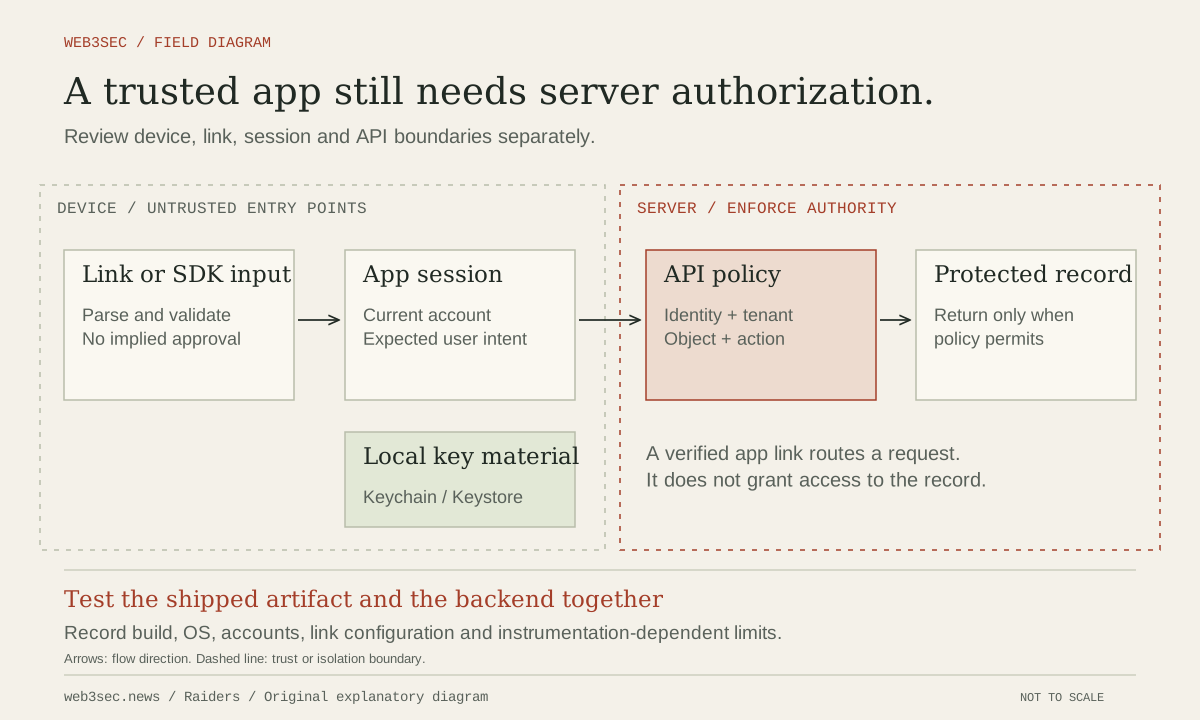
Use structured URL parsing and validate the expected scheme, host, path and parameters against the intended operation. Reject unsupported or ambiguous inputs without silently falling back to a sensitive route. Do not pass untrusted destinations directly into a WebView, native bridge or account-changing operation. Apply server-side authorization to the requested object and action even when the app has already navigated to the correct screen.
Exercise account state and platform entry conditions
Create synthetic accounts and records in an approved test environment. Test expected links while signed in, signed out, after logout, after account switching and when resuming a previously queued request. Verify that login continuation does not reuse an obsolete account assumption. Record whether the continuation reconstructs its destination from trusted session state. Observe actual API results and state changes; displaying a sign-in screen is not proof that background data retrieval or a consequential action was prevented.
Test the installed and uninstalled app paths and the supported OS versions, recording whether navigation opens the app or browser. Review Android exported components that can enter the same workflow without the normal link handler. Android documents the exported attribute and its version-dependent history, so inspect the actual manifest and component controls rather than assuming that an internal-looking screen cannot be launched externally.
Keep fixes and release verification tied together
When a defect is found, identify whether association, parsing, session continuation, component exposure or server policy failed. Fix the shared boundary where possible and examine alternate links into the same action. Domain verification cannot repair missing record authorization, and hiding a route from navigation cannot protect an exported handler. Preserve allowed public and authenticated flows alongside newly denied cases.
Retest the patched build with the relevant domain-association configuration and backend version. Include a fresh installation and the intended update path when those conditions affect routing or persisted state. Keep link fixtures free of real tokens and customer identifiers, and revoke temporary test credentials when the work ends. Revisit coverage when marketing domains, callback URLs, SDKs, native plugins or authentication flows change.
Controls to take away
- Verified domain routing does not validate arbitrary link parameters.
- External entry points must preserve current identity and resource authorization.
- A successful navigation test is not a security test of the action it reaches.
Take this to your next review
Working checklist
Use this as a starting point, then assign owners and record evidence in your team's own system. Checks here reset when you leave or reload this note.
0 of 5 reviewed
Common questions
Does a verified app link prove that its parameters are safe?
No. Domain association helps determine which app handles a link; it does not authorize a record access or validate arbitrary path and query values. The handler and relevant server must still enforce the intended operation.
Why test a deep link after an account switch?
A queued or resumed link may refer to a record from a different account context. Verify that the app resolves the current authenticated identity and the server authorizes the requested object before returning data or performing an action.
Are custom URL schemes and verified web links equivalent?
No. Their routing and association mechanisms differ by platform and configuration. Inventory the actual handlers, inspect the installed app’s behavior and avoid treating a successful navigation as evidence of secure parameter handling.
Sources & further reading
The references below support this note. Adapt the procedures to your systems, access model and recovery requirements.
A correction or a better primary source? Send Raiders the article URL and evidence. Editorial policy.