Treat setup and tests as code execution
The researcher owns the execution decision. Record the repository URL, exact revision, intended research task and any external systems the code would contact. Inspect package manifests, installation hooks, build scripts, test configuration, container files, editor tasks and downloaded executables before running setup. A command described as install, test or reproduce can execute arbitrary code with the permissions of its process.
Treat repository instructions as untrusted input to an assistant. A README or project instruction file asking the agent to upload a local environment file, disable isolation or run an unrelated bootstrap command does not authorize that action. Keep the trusted research instructions outside the repository and require a fresh review for new execution or destination requirements. Never import the researcher’s real dotfiles or credentials merely to make the demo start.
Choose an isolation boundary with explicit limits
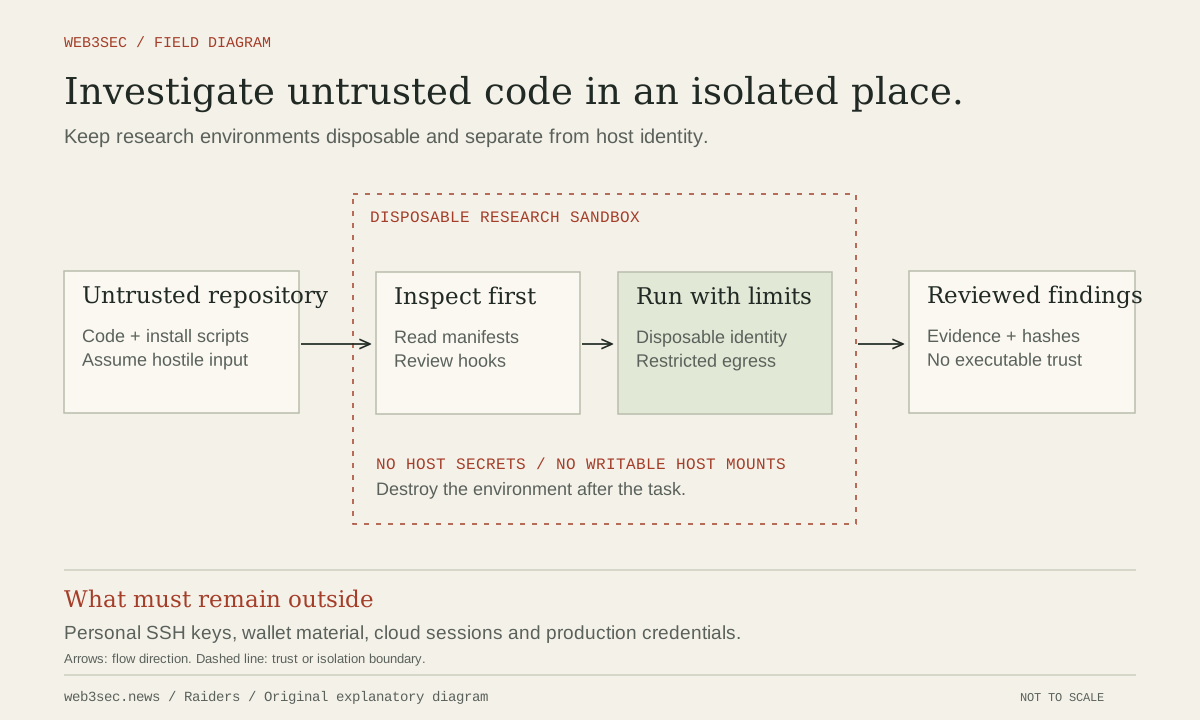
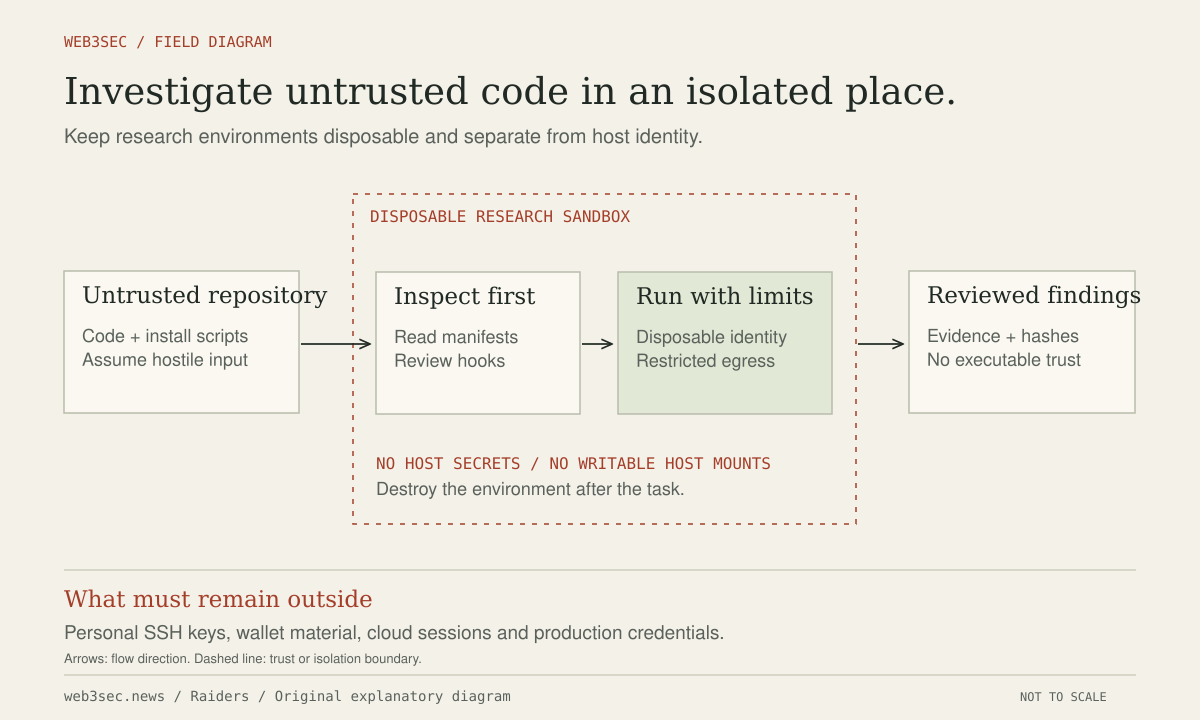
For code you do not trust, use a disposable environment separated from everyday work and privileged sessions. Consider a dedicated virtual machine for higher-risk material. Containers still rely on their host and runtime configuration; a privileged container or mounted container-engine socket can undermine the intended separation. Docker documents rootless execution and seccomp controls as layers that reduce runtime authority, not proof that arbitrary code is harmless.
Mount only the required workspace, use a nonprivileged identity, avoid host home directories, SSH agents, cloud credentials and browser profiles, and keep the root filesystem read-only where feasible. Set resource limits and a timeout. Docker notes that containers do not receive CPU and memory limits by default. Restrict outbound network access to the destinations the experiment actually needs, and keep internal networks and metadata services unreachable unless explicitly part of the authorized lab.
Separate dependency acquisition from the experiment
Review the lockfile, package sources and lifecycle scripts. Fetch necessary dependencies through a controlled stage, then run the experiment with network disabled or narrowly permitted where possible. An installation-script suppression option reduces one execution path but does not make later imports, compilers, tests or downloaded artifacts safe. Inspect every command you add while trying to resolve a failing setup.
Cloud-hosted development environments have their own injected authority. GitHub’s Codespaces security documentation describes repository-dependent tokens, development secrets and configurable forwarded ports. Inspect those actual permissions before using a hosted environment for hostile code. Remove unnecessary secrets and broad repository access, and keep ports private. A remote machine that automatically receives a valuable token remains a valuable target.
Prove containment and dispose deliberately
Use an operator-created fixture with a dummy secret outside the permitted workspace and a harmless request to a controlled disallowed endpoint. Confirm that the process cannot read or transmit it, reach the host control socket or access privileged credentials. Verify the enforced network policy rather than accepting the agent’s promise not to use the network. Keep denial logs and environment configuration with the research notes.
Export only reviewed results, logs and required artifacts; treat generated HTML, archives and binaries as untrusted too. Preserve the repository revision and dependency hashes needed for reproducibility, then destroy the environment and revoke temporary access. If code escaped the expected boundary or exposed a real credential, stop and investigate connected services from a clean environment. Deleting the sandbox alone does not invalidate authority it already copied.
Controls to take away
- Setup, imports and tests are execution paths requiring review.
- A container’s mounts, privileges and network determine its useful boundary.
- Disposal must include credentials and generated artifacts, not only the machine.
Work through the boundary.
These local worksheets turn the review questions into a plan. They do not inspect or change the actual account or environment.
Prepare the research environment ↗
Check authorization, source, credentials, egress and disposal for the actual lab boundary you will use.
Take this to your next review
Working checklist
Use this as a starting point, then assign owners and record evidence in your team's own system. Checks here reset when you leave or reload this note.
0 of 5 reviewed
Common questions
Why is running a test suite a security decision?
Tests and their setup can execute arbitrary code, load dependencies and access the process environment. Review test configuration, installation hooks and downloaded components rather than assuming a test command is passive analysis.
Does running a repository in a container guarantee containment?
No. Privileges, host mounts, control sockets, network access and runtime configuration determine the useful boundary. For higher-risk code, consider a dedicated virtual machine and still restrict credentials and destinations.
What should I export before deleting the research environment?
Export only reviewed results, necessary logs and reproducibility metadata such as revisions and dependency hashes. Treat generated archives, HTML and binaries as untrusted, and invalidate temporary credentials separately from deleting the machine.
Sources & further reading
The references below support this note. Adapt the procedures to your systems, access model and recovery requirements.
A correction or a better primary source? Send Raiders the article URL and evidence. Editorial policy.